Table of contents:
Overview
The purpose of the DMF API is indirect device integration through a device management service into Bosch IoT Rollouts. It is message-based and optimized for cloud service-to-service interaction. The message transport is AMQP 0-9-1 compatible with message bodies in JSON. The API itself is compatible with the Eclipse hawkBit DMF API.
The DMF API is available only in Starter and Standard Service Plans. Note that the API has to be activated.
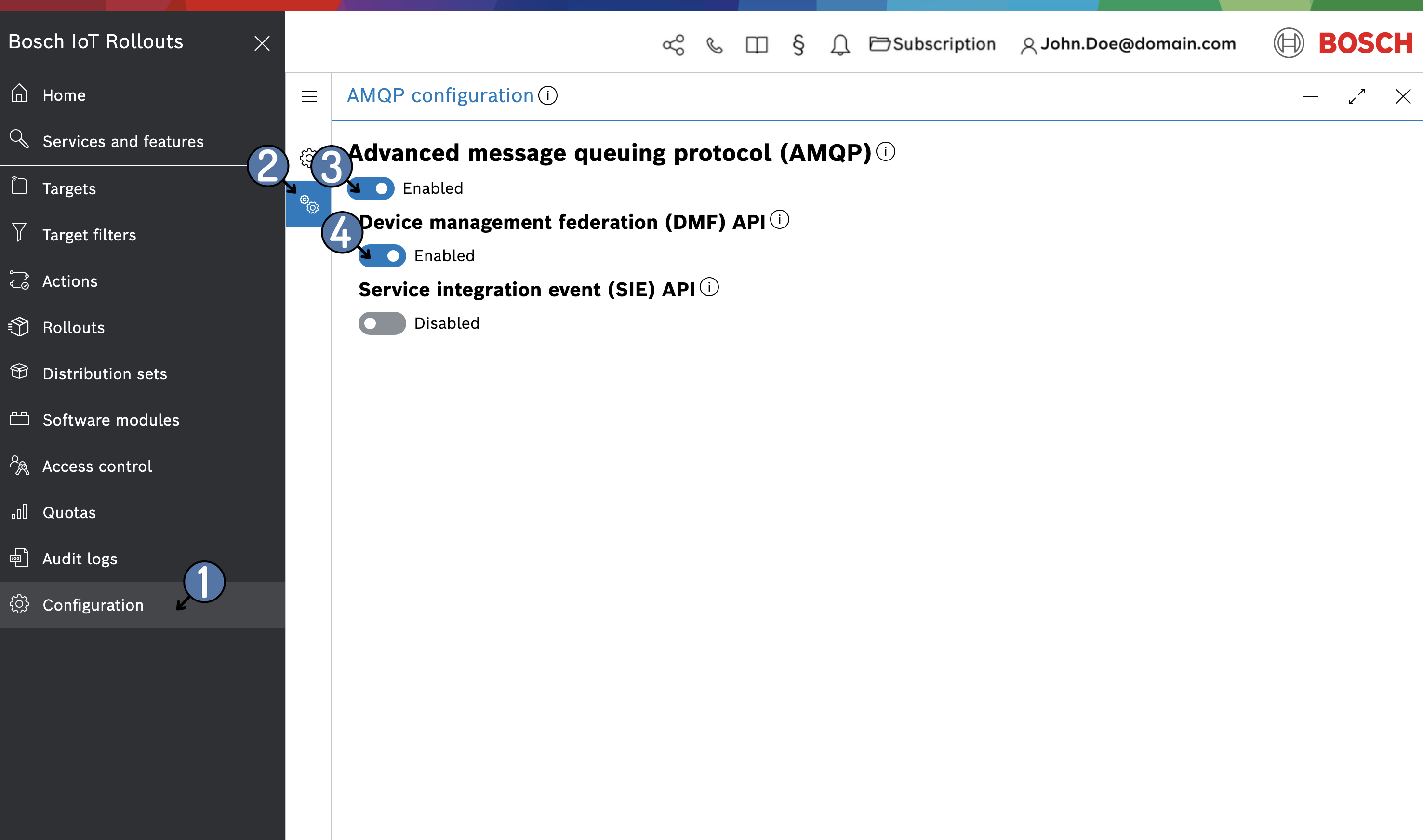
To activate the DMP API
- Open the Configuration UI feature by selecting Configuration from the main navigation menu.
- Open the AMQP Configuration tab.
- Enable Advanced message queuing protocol (AMQP)
- Enable Device management federation (DMF) API
Please be aware of the existence of a Quota. We also recommend checking out the target state machine and action state machines.
Eclipse hawkBit™ compatibility
Bosch IoT Rollouts DMF API is fully compatible with Eclipse hawkBit’s DMF API in version 1 (v1).
The hawkBit project provides Java representations that allow decoding the message body at runtime into a Java object. The Java models can also be used to encode Java objects into JSON bodies for sending messages to Bosch IoT Rollouts.
The model is available on Maven Central.
<dependency> <groupId>org.eclipse.hawkbit</groupId> <artifactId>hawkbit-dmf-api</artifactId> <version>0.2.0</version></dependency>Basics
There are three basic concepts of AMQP:
- Exchanges - what you publish to.
- Queues - what you consume from. DMF API defines four messages.
- Bindings - configuration that maps an exchange to a queue.
Queues are just a place for receiving messages. Bindings determine how messages get into them. Queues can also be bound to multiple exchanges.
Exchanges are for publishing messages. The user decides who can publish on the exchange and who can create bindings on that exchange for delivery to a specific queue.
Rollouts off the shelf exchanges and queues
For communication, Bosch IoT Rollouts will create all necessary queues, exchanges, and bindings for the user. So it is very easy to communicate with Bosch IoT Rollouts out of the box. The exchange name for sending a message to Bosch IoT Rollouts is dmf.exchange.
The queue name to receive messages from Bosch IoT Rollouts is sp_direct_queue.
Bosch IoT Rollouts sends messages to the sp.direct.exchange, which is bound to the sp_direct_queue.
A word on reliability
In general, the AMQP-based message transfer as used in DMF does not guarantee end-to-end delivery. However, we encourage DMF users to:
- Leverage the THING_CREATED poll mechanism, as Bosch IoT Rollouts will automatically re-transfer open DOWNLOAD_AND_INSTALL, CANCEL_DOWNLOAD, or CONFIRM messages to the client after every poll (see above).
- Leverage AMQP’s best practices to ensure a reliable transport of messages sent to Bosch IoT Rollouts.
- Leverage Bosch IoT Rollouts storage of the message correlation ID in the action history to investigate a potential message loss.