Table of contents:
Introduction
During an update, the action moves through multiple states. Based on the current state, the client has different options for feedback. The update server requires a state from the client to finish the action, either successful or with an error. Everything else, via intermediate feedback, is optional, and the granularity of that feedback is up to the client. Be aware that both device integration APIs (i.e., DDI and DMF) will present only the oldest active action to the client until that action is confirmed. Then the next action will be presented, and so forth. Because the update server can never be sure which actions the client has started working on, it will keep every action in line until it is confirmed. As a result, this can include cancellations for actions the client never started working on (e.g., because they were never online).
For example, if an update for set A is followed by an update for set B, both actions (the one for A on CANCELING and the one for B on RUNNING) will be sent to the client, in the correct historical order. In this example, the client must confirm that A is either installed or the cancellation is accepted (i.e., not installed) before the update for B is presented. As mentioned above, this is even the case when the client was not aware of the update to A in the first place.
By default, the update server requires the client to handle canceled actions in the queue and continue with the next pending update as described. However, to handle the transition from RUNNING to CANCELING is not required by the client. The update server will not enforce this (e.g., reject a FINISHED update on an action that is in CANCELING), as this would complicate the client's handling. It is recommended that the client send a CANCEL_REJECTED if it becomes aware of the transition change (e.g., in a DDI case through continuous polling during the update), as this will make it transparent to the operator why the update was completed, even if it was canceled.
Note: if repository.actions.autoclose.enabled is activated in the system configuration (via the Management API or UI), a new assignment will transition from RUNNING to CANCELED.
In this case, the client is not informed of the cancellation, and the action is closed immediately.
This is useful in scenarios where the client does not support cancellation confirmation.
Keep in mind that one consequence of auto-close is that if the client has already started the action, it cannot confirm its (un-)successful execution (due to the closed state).
Defined action types
The action type influences the state transitions of an Action. Different action types produce different behaviours.
Icon | Action Type | Description |
|---|---|---|
| Forced | The device is advised that the update has to be executed immediately. |
| Soft | The device is advised that the update can be executed at any time, e.g., with user approval or in the future regular update time plan. |
| Download Only | The device is advised that the update has to be only downloaded, and not installed. |
| Time Forced | Configures a point in time where the rollout's type switches from Soft to Forced. |


Defined action states
In general, the update server has two types of states.
Action state refers to states of the action itself, e.g., is it still running, not yet running, or completed.
Other entries represent intermediate feedback stored in the history but have no impact on the state of the action or the target. This is typically the case for feedback during the lifetime of an action.
Type | Status reported | Description |
|---|---|---|
Action state | FINISHED | The action has completed successfully. |
Action state | ERROR | The action has been completed with an error. |
Action state | CANCELED | The action has been canceled, and this cancellation has been confirmed by the client (or |
Action state, | RUNNING | Action is pending. |
Action state | CANCELING | The action has been canceled, but this change has not yet been confirmed by the client. Note: Because the client might not be aware of the transition from RUNNING to CANCELING, the update server still accepts regular feedback as if the cancellation never happened, i.e., when the update is already in process by the client. |
Action state | SCHEDULED | Action is in a waiting state, i.e., the action is scheduled in a rollout, but the group it belongs to has not yet started. |
Action state | WAIT_FOR_CONFIRMATION | Action is in a waiting state, i.e., the action is scheduled in a rollout, but the user has to confirm it first. Applicable only if the user consent flow feature has been enabled for the tenant prior to the start of the action. Once the update is confirmed, it moves to the RUNNING state. |
Intermediate feedback | WARNING | Action is still running, but the client informs the server about an issue at runtime. Only for informational purposes and no state transition. |
Intermediate feedback | RETRIEVED | The update server marks this state if the action has been pulled by the client in the DDI case. In the DMF case, this status can be provided optionally by the device integration layer. |
Intermediate feedback | DOWNLOAD | The device informed the update server that it started the download. |
Intermediate feedback | DOWNLOADED | The device informed the update server that it completed the download. If the assignment was of type Download Only, the action for the device will be considered successful and its action state will change to FINISHED. If the assignment is not of type Download Only and a maintenance window (see below) is activated, the device is supposed stop progress here until it enters the window. |
Intermediate feedback | CANCEL_REJECTED | The client has rejected the cancellation. The action moves back from CANCELING to RUNNING. |
Action state transitions
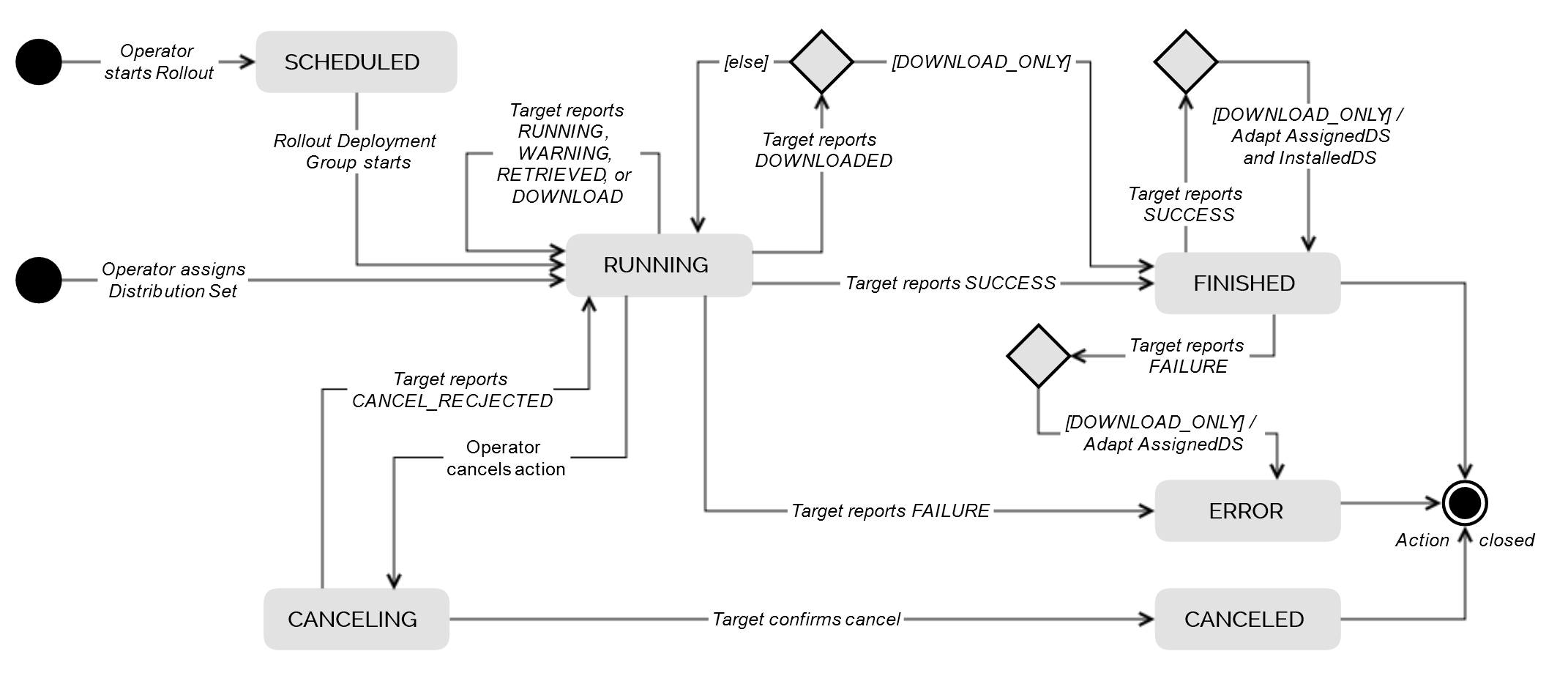
Action state transitions with user consent flow
When the user consent flow feature is enabled for the tenant, a new WAIT_FOR_CONFIRMATION state is introduced, indicating that the action is waiting for confirmation by the end user of the target devices.
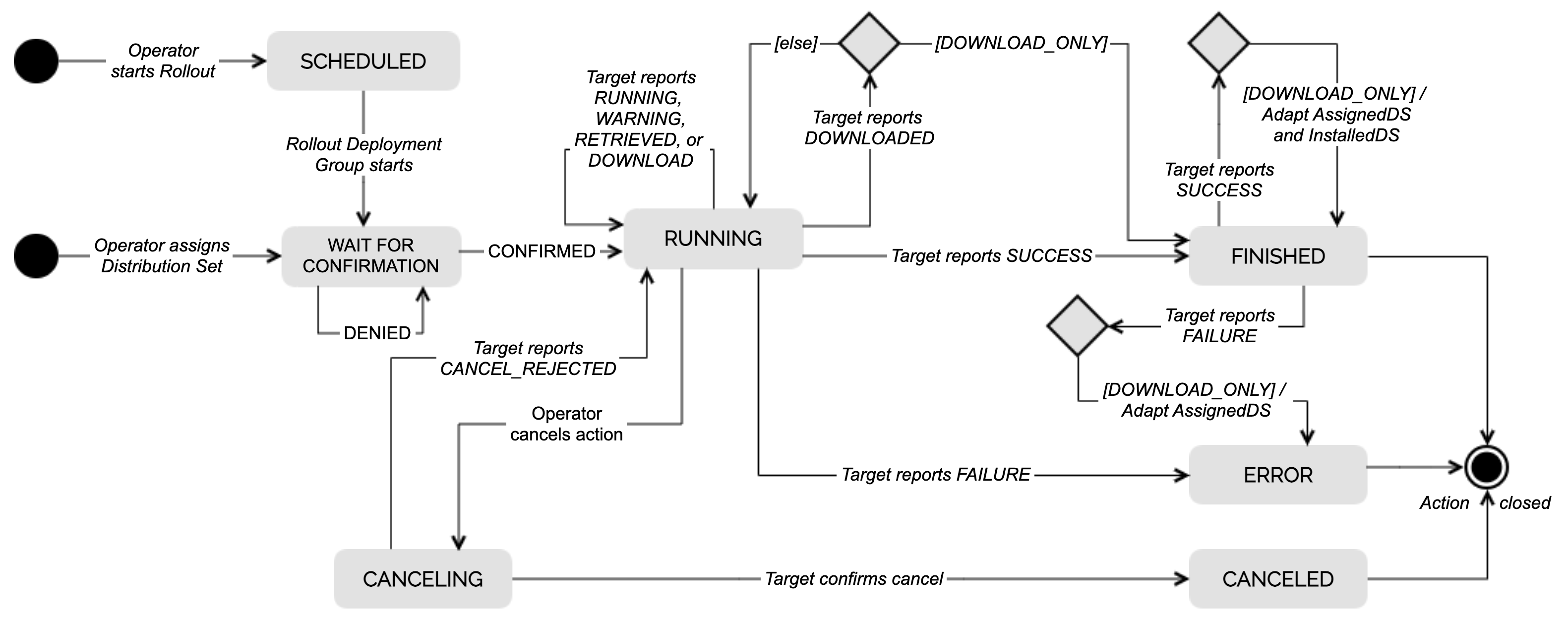
After you start a rollout or assign a distribution set, the action eventually reaches the WAIT_FOR_CONFIRMATION state. It then remains in this state until the user confirms or rejects the action:
- Accepting the action will change the state to RUNNING, and the flow described above is essentially the same as the default flow.
- Rejecting the action will preserve the WAIT_FOR_CONFIRMATION state. The reason is to give the user a chance to accept it at some point, if needed.
If you want to cancel the action, you can cancel it, which will change its state to cancelled and close it.
Maintenance Window
In addition to the straightforward approach of informing the device (via DDI or DMF) to download and install the software in a single transaction, Rollouts supports separating download and installation into separate steps.
This feature is called Maintenance Window, where the device is instructed to download the software first, and then, when it enters a defined (maintenance) window, the installation triggers.
The Rollouts allows as part of the provisioning action to define the maintenance window. It is based on defining the start time of the window (in Cron Quartz notation), a length and the timezone of the definition. The window can have a repeating character (e.g. “at 12pm (noon) every day”).
Both, in Direct Device Integration (DDI) API and Device Management Federation (DMF) API, Bosch IoT Rollouts will inform the device outside/before the window to download only. Only during the window the device gets the download and install command.
In DDI case Rollouts will optimize the sleep parameter provided to the device as well to tune DDI polls into the window. This is necessary to ensure that for example an one hour maintenance window is hit by devices that usually poll only once a day.
In DMF case the integrated device management or connectivity service has to ensure that the devices are guided into the window.
Note: maintenance window for the time being is only supported for direct distribution set to target assignments (by Management UI or Management API) and not by Rollout management
Multi-Assignments (beta)
One of the main paradigms of Bosch IoT Rollouts is, that a Distribution Set represents the currently installed software of a device. Hence, a device can have only one Distribution Set assigned/installed at a time. With Multi-Assignments enabled, this paradigm shifts. Multi-Assignments allows to assign multiple Distribution Sets to a device simultaneously, without cancelling each other. As a consequence, an operator can trigger multiple campaigns addressing the same devices in parallel.
This feature (multi.assignments.enabled) can be activated via system configuration (by Management API or UI).
Action weight (multi-assignments only)
When multi-assignments is enabled, weights are used to define the importance of one update over another. The value of a weight is between (and including) 0 and 1000. The higher the weight the more important is the assignment represented by the action. Also, when defining a rollout or an auto-assignment, and multi-assignments is enabled a weight value has to be provided. This value is passed to the actions created during the execution of these rollouts and auto-assignments. If no weight was provided the highest value of 1000 is used instead.
Consequences
While this feature provides more flexibility to the user and enables new use-cases, there are also some consequences one should be aware of:
Critical
- This feature is in beta and may change unannounced.
- For now, this feature is opt-in only. Once activated, it cannot be deactivated.
Minor
- While on DMF-API a MULTI_ACTION request is sent, DDI-API only exposes the most urgent open action (according to the weight of the actions).
- All information regarding the currently assigned or installed Distribution Set does only respect the last assignment, as well as the last successfully installed Distribution set.
This also affects:- Pinning a target or Distribution Set in Deployment View.
- Statistics about installed or assigned Distribution Sets.
- Auto close running actions, when a new Distribution Set is assigned (
repository.actions.autoclose.enabled)is deactivated. - Marking a Distribution Set to be a Required Migration Step is deactivated.